IoT, ENDPOINT AND MOBILE SECURITY – THE EFFECTS OF BYOD ON CYBERSECURITY
Several industries and IT personnel have come to terms with the modern-day approach of Bring Your Own Device (BYOD), as they strive to make operations more and more flexible, efficient and seamless, addressing every possible challenge that could hinder the workflow in any way. Companies are adopting workplace mobility practices amidst the proliferation of modern technology and the increasing number of connected devices that people are using in their day-to-day routine. Permission to use own mobile devices at the workplace and the growing network of IoT devices is leading to the expansion of network with an increasing number of endpoints. It has become imperative for the companies to have befitting cybersecurity policies and a robust endpoint security solution that best suits their work model and ensures a safe haven for the business-critical processes and data.
But before defining cybersecurity policies around BYOD and mobile devices and IoT devices, one should be clear with the distinctions between mobile device management and endpoint security. They should profile the IoT and mobile devices to understand the different operating systems they use, the functions they are capable of performing and the actual utility of them for the business. This will help in defining policies that can effectively control the use of such devices at the workplace as well as outside the work premises for work purposes.
As per a report by Crystal Market Research, the global BYOD market is expected to grow at a CAGR of 15.38% between 2012 and 2022 and reach USD 318.41 billion in 2022.[1] This trend, often labelled as IT consumerisation, is here to stay, as more and more companies adopt BYOD model, allowing employees to carry their own devices and connect them with the organisational network to access important business data and applications for work purposes.
While BYOD is increasingly touted as an excellent business model, well suited for improving workplace flexibility and productivity; however, it has a significant impact on the IT structure of an enterprise.
Some of the major impacts of BYOD on a company’s cybersecurity setup are as follows:
Expands IT infrastructure
More and more owned portable devices like laptops, tablets and smartphones brought by employees to offices significantly expand the network as they serve as new endpoints to the network. These personal devices have to be connected to the company’s IT infrastructure for which the IT team has to identify the employees’ mobile devices that they’ll be using to access the corporate data and then make necessary adjustments to the company’s IT setup to accommodate them.
Companies are also required to audit these devices to ensure that they align with the company’s security stipulations and device policies, and all this work increases the IT management costs of the company.
Increased risk of data leakage
More and more personal devices used for work purposes increase the number of endpoints on the company’s IT network. Presence of multiple endpoints makes it difficult to monitor the activities on each device and tackle malicious programmes or users that try to gain unauthorised access to such devices and thereby the IT infrastructure. This escalates the threat of cybersecurity breach and data leakage.
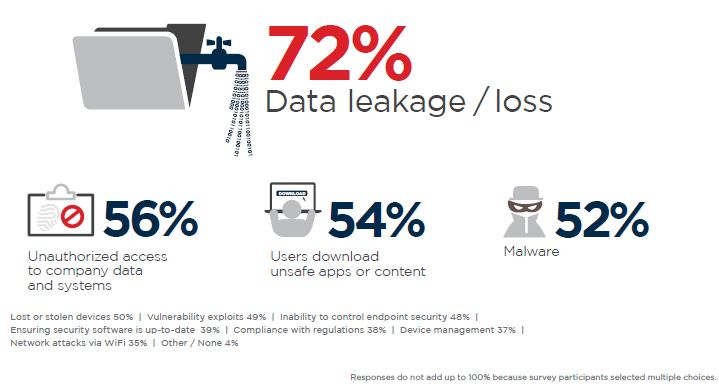
Mobile devices are considered the weakest link to a company’s security framework. They need to be constantly updated with the latest security patch to cover any type of loopholes and stay protected from any type of malware or virus attack or any unauthorised access. Employees are as much responsible for ensuring the security of their own mobile devices and should see to it that their devices are password protected and updated with the latest software and security patches. The employees and companies are both responsible for reviewing a mobile device’s compliance with the security protocols.
Mixes personal data and corporate data
Devices carried as part of the BYOD model have both corporate and personal data, which makes the loss or theft of such devices a riskier affair.

Companies should take the initiative to back up the essential corporate data present on the device in order to retrieve the data in case of a technical glitch, cybersecurity breach or theft or loss of the device.
Companies can encourage containerisation, which helps in isolating business content in its own workspace thereby keeping the business information secure while still allowing the employees to use their devices for personal as well as work purposes. The approach also helps the company to safely remove the business-related information from the user’s device when the employee exits the company.


 It is still fairly recent that Google merged Google Voice and Hangouts
into one service as we know it today. The integration brings voice
calling, SMS and, more recently, MMS support to far more users than
Google Voice could reach.
It is still fairly recent that Google merged Google Voice and Hangouts
into one service as we know it today. The integration brings voice
calling, SMS and, more recently, MMS support to far more users than
Google Voice could reach.