Ofer For You (1)

Showing posts with label keyboard. Show all posts

Saturday, 8 November 2014

Some Shortcuts That Can Save Your Time


You manage your time , you manage your life..

We all have just 24 hours to make our destiny so why waste minutes where things can be done in seconds. Here we are introducing you with some of the shortcuts that can really help you save your precious time while social networking. 


Facebook Shortcuts :


Gmail Shortcuts :
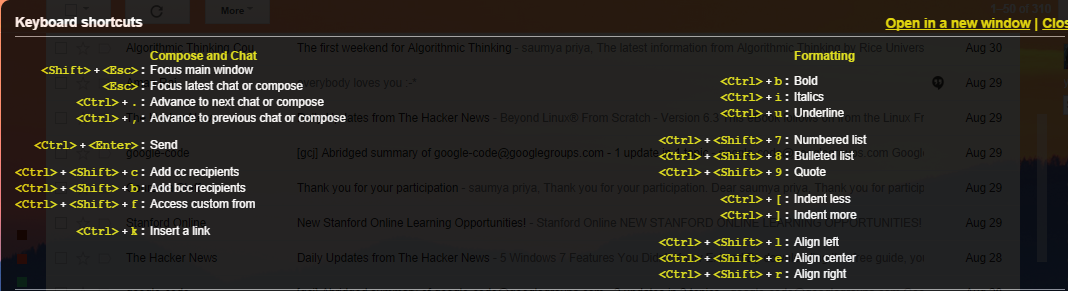


YahooMail Shortcuts :


PS : Want to try somemore?? Go to popular sites and press " ? ". 


By "Kunal Vohra", Director@H2K

Having Problem.?.!!! Connect with Admin
BBM: 7F72A48D


 Kunal Vohra
Download Our Official Android App & Get Free Internet


"The Hackers Street"

For Daily Updates 

Tuesday, 5 August 2014

Ghost keyboard Typing – Notepad Tricks

Hey guys , Today your Admin "Kunal Vohra" is going to share with you a Short but Cool Notepad Trick. "Ghost keyboard Typing – Notepad Tricks"


People Use notepad to type and save some important or regular information, But very less people know that there is much more that we can do with Notepad.
What if i say that we can make Notepad to type automatically what ever we wish to…. Unreal ? Yes it is possible and you will be doing it by yourself in just a few moments.You can show it to your friends and surprise them. Basically it is a prank that you can do with anyone just for fun.
This Process is Also known as ” Ghost Keyboard Typing ” Because you dont even touch your keyboard and words starts displaying in your notepad automatically, When you show this to your friend or anyone else, they will be excited to learn this from you as well.


Notepad trick to Type Automatically


Step 1: Right click on your desktop and select create new text document or simply Open Notepad.
Step 2: Exactly Copy the code given below and Paste it in notepad document that you have just created.

set wshshell = wscript.CreateObject(“wScript.Shell”)
wshshell.run “Notepad”
wscript.sleep 400
wshshell.sendkeys “S”
wscript.sleep 100
wshshell.sendkeys “M”
wscript.sleep 120
wshshell.sendkeys “A”
wscript.sleep 200
wshshell.sendkeys “R”
wscript.sleep 100
wshshell.sendkeys “T”
wscript.sleep 140
wshshell.sendkeys “T”
wscript.sleep 100
wshshell.sendkeys “R”
wscript.sleep 50
wshshell.sendkeys “I”
wscript.sleep 120
wshshell.sendkeys “C”
wscript.sleep 170
wshshell.sendkeys “K”
wscript.sleep 100
wshshell.sendkeys “S”
wscript.sleep 50
wshshell.sendkeys “.”
wscript.sleep 120
wshshell.sendkeys “N”
wscript.sleep 160
wshshell.sendkeys “E”
wscript.sleep 200
wshshell.sendkeys “T”
wscript.sleep 100


Step 3: Save the above code in Notepad file As ” smarttricks.vbs ” (Without Quotes ) but make sure  While saving this file select Save as type  “All files” and extension must be .vbs
Step 4: Now double click on The saved File, You will see “SMARTTRICKS.NET ” will be typed  Automatically, This is one of the Most awesome Notepad Trick that You learned today. Moreover  you can edit the Words In the above given Code with any desired words you want Notepad to type for you. e.g. : MY FRIEND READING THIS IS FOOL..vb

IMPORTANT !!!
While Double Clicking on the saved file if you see an error box like ” line 1 ” and “Char 37” Then dont worry, Right click on smarttricks.vbs and click on edit,
Now delete all Double quotations ie : ”  and Type them all manually from your keyboard, save it and now you will have no errors.


Still Having Problem..!!! Connect with Admin Kunal Vohra

Download Our Official Android App & Get Free Internet*

"The Hackers Street"

For Daily Updates


Wednesday, 21 August 2013

HOW TO TYPE SYMBOLS WITH KEYBOARD


HOW TO TYPE SYMBOLS WITH KEYBOARD


Alt + 0153..... ™... trademark symbol

Alt + 0169.... ©.... copyright symbol

Alt + 0174..... ®....registered ¬ trademark symbol

Alt + 0176 ...°......degree symbol 

Alt + 0177 ...±....plus-or -minus sign

Alt + 0182 ...¶.....paragraph mark

Alt + 0190 ...¾....fraction, three-fourths

Alt + 0215 ....×.....multi plication sign

Alt + 0162...¢....the cent sign

Alt + 0161.....¡..... .upside down exclamation point

Alt + 0191.....¿..... upside down question mark

Alt + 1...........smiley face

Alt + 2 ......☻.....black smiley face Alt + 15.....☼.....sun

Alt + 12......♀.....female sign

Alt + 11.....♂......male sign

Alt + 6.......♠.....spade

Alt + 5.......♣...... Club

Alt + 3............. Heart

Alt + 4.......♦...... Diamond

Alt + 13......♪.....eighth note

Alt + 14......♫...... beamed eighth note

Alt + 8721.... ∑.... Narysummation (auto sum)

Alt + 251.....√.....square root checkmark

Alt + 8236.....∞..... infinity

Alt + 24.......↑..... up arrow

Alt + 25......↓...... down arrow Alt + 26.....→.....right arrow

Alt + 27......←.....left arrow

Alt + 18.....↕......up/down arrow


 Alt + 29......↔...lef t right arrow


Happy Hacking


Still Having Problem..!!! Connect with Admin Kunal Vohra

Download Our Official Android App & Get Free Internet*

"The Hackers Street"

For Daily Updates