Ofer For You (1)

Showing posts with label Microsoft. Show all posts

Thursday, 3 October 2019

Microsoft just announced at its big product event, a Two-screen Android phone

Microsoft surprised onlookers with a pair of new dual-screen hardware devices it’s planning to release next holiday: The Surface Neo laptop and the Duo smartphone, which runs Google’s Android operating system rather than Microsoft Windows.

The announcements came at the end of Microsoft’s annual hardware event, where it also introduced refreshed versions of its Surface tablets and laptops, and a new Surface that runs a Qualcomm low-powered chip based on a design from ARM — similar to those found in Apple’s iPad and most smartphones — rather than the Intel-based processors that traditionally run Windows PCs. It’s the third time Microsoft has unveiled an ARM-based tablet, but its past efforts failed at the market because they could not efficiently run traditional Windows apps.


“With the Surface we focused on three distinct ambitions,” Microsoft CEO Satya Nadella said. “We wanted to put people at the center of every device experience. We wanted to innovate across form and function, especially with a focus on how we can drive the next level of creation and productivity. That led to the first Surface Pro 2-in-1. Today we will share the next chapter of this journey,” Nadella said. “We believe the next decade will be about creation and amplifying what we can do as humans.”

Microsoft’s event follows a flurry of hardware announcements from rivals like AppleAmazon, and Samsung. The launches allow the companies to get their products out in front of consumers before the upcoming holiday shopping season.
Here’s a rundown of everything that was announced:


The big surprise: Microsoft Surface Duo phone
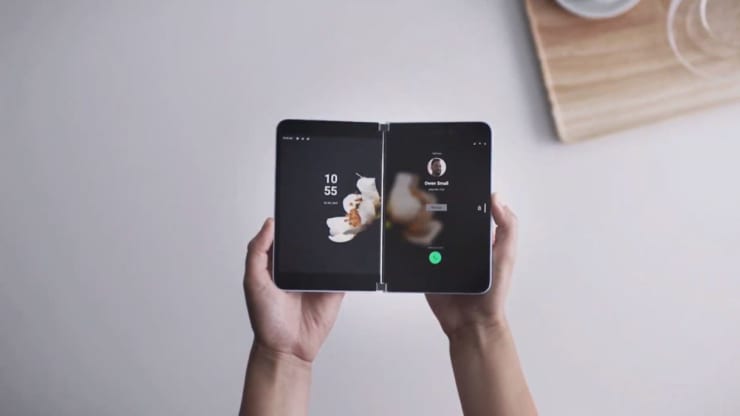


The biggest surprise was a small smartphone that can run two apps on two different screens. It’s called the Microsoft Surface Duo and runs Android, and will be available in the 2020 holiday season.

It’s the first return for Microsoft to the mobile space since it abandoned Windows Phone years ago. “Make no mistake, this product is a Surface,” said Microsoft product chief Panos Panay, “because of how productive you can be on it. We know, scientifically, that you will be more productive on two screens.”


It has a 360-degree hinge, two 5.6-inch displays and can completely fold up when you’re not using it.

“We’re partnering with Google to bring the absolute best of Android into one product,” Panay said, noting it will support all Android apps. Unlike the Samsung Galaxy Fold, which also folds, a hinge runs down the middle, which should prevent damage, since there’s not a single screen across the entire inside.


Saturday, 25 October 2014

Microsoft shows Android some love with a lock screen and other apps


By "Kunal Vohra", Director@H2K


The new Microsoft is not like the old Microsoft. Under Satya Nadella, the venerable tech giant is opening up to competing platforms, Android included.
As part of its Garage initiative (think Google’s 20% time), Microsoft has announced today the release of two new Android apps and an Android Wear app, joining the dozens of applications that Microsoft already has in the Play Store.
The most interesting is Next Lock Screen, a lock screen replacement geared towards productivity. “We saw there were a number of lockscreen apps, but none were focused on the productivity user,” said Microsoft’s Lawrence Ripsher. Next Lock Screen is all about getting things done fast, though at least for now, the number of things you can accomplish is rather limited. Your calls, texts, and calendar appointments are displayed as a list, and you can swipe each item to act on it (call back, dismiss, etc.)
Microsoft highlights the ability to quickly join a conference call, which is useful, but unlikely to interest many users.
Next Lock Screen also lets you quickly access your favorite apps and settings, as well as organize them in work, home, and on-the-road categories. The lock screen does not learn which apps to show on its own, though given the focus on speed and efficiency, user-set preferences are probably preferable anyway.
Microsoft’s new launcher features a nice, if not special design, without many bells and whistles. If you use a PIN or password to secure your device, swiping Next Lock Screen away takes you to the default lock screen, which is both a convenience (you see your stuff right away) and a potentially privacy problem, since your notifications and calendar entries are not protected by a PIN.
The other two apps released by Microsoft Garage are Journeys & Notes, a travel log that resembles Foursquare in functionality, and Torque, an Android Wear app that lets you access Bing’s voice search with just a twist of your hand. So instead of lifting your hand and saying “OK, Google” to use Google Now, you flick your wrist and use Cortana. It’s a neat idea, but we doubt many users will ditch Google Now in favor of Microsoft’s competing offer – still, we can’t blame Microsoft for experimenting.
Next Lock Screen, Journeys & Notes, and Torque are all available in the Play Store for free. It appears that availability is limited to North America.

Sunday, 12 October 2014

Microsoft's Windows 10: What's new and how to get the preview bits


windows10
Thanks to many leaks leading up to Microsoft's reveal about its next version of Windows, there wasn't a whole lot that those of us who've been paying attention didn't know. But Microsoft execs did provide a few updates about the operating system known as Windows Threshold.


First, of course, is the name. Microsoft is calling its next Windows release "Windows 10," not Windows 9, as many had expected. The reason? It's going to be the last major version of Windows (my sources say) and Microsoft wanted to signify it will be a big and cross-platform release.
The Windows 10 core will run on PCs, tablets, Windows Phones and even the Xbox at some point in the future. The user interfaces will be tailored for each type of device, but there will be a common core of operating system elements that will work across all these platforms. With Windows 10, Microsoft will be consolidating its various app stores, officials confirmed during a preview event on September 30 in San Francisco.

Insiders also will be asked to provide feedback in a variety of forms to Microsoft about the features they like and dislike.
Tomorrow, on October 1, Microsoft will open up itspreview.windows.com site so that those interested in testing the Enterprise Technical Preview version of the operating system can download the early bits. Those who sign up through the preview site will be enrolled in Insiders Program. Via this program, Microsoft will push regular updates through Windows Update to the initial tech preview over the coming months.
The Enterprise Technical Preview (Build 9841) will work on x86 machines only. Microsoft is not yet making available a test build of the ARM version of Windows 10. Microsoft officials said to expect that more consumer-focused preview to arrive in early 2015. (Previous leaks have pegged availabiity of the consumer preview to the January/February 2015 timeframe).

Some time in the coming months (I'm betting late October at TechEd Barcelona), Microsoft will go public with what it's doing on the Windows Server and systems management front with Windows 10. And at the next Build conference in April 2015, Microsoft will talk more about the developer story around Windows 10, officials confirmed today.
Terry Myerson, head of Microsoft's Operating Systems Group, told those of us attending the event today that Microsoft is aiming to deliver the completed version of Windows 10 by mid-2015. Previous leaks have indicated that Microsoft is aiming to deliver Windows 10 by "spring 2015."
Most of the new features that Myerson and Joe Belfiore, who runs Microsoft's operating system experience team, demonstrated for the first time publicly on September 29, had leaked via sources.
The new Start Menu, virtual desktops and windowed Metro-Style apps running on the Desktop are all part of the Enterprise Technical preview build. The charms bar is still part of the Enterprise Technical Preview at this point, but how charms will be supported going forward will be changing, Belfiore confirmed.
There were a couple of new features that Microsoft execs demonstrated, including a new Snap Assist feature that is aimed at helping users figure out how to "snap" apps side-by-side. Users will be able to snap apps horizontally and vertically with Windows 10. A new task view will help users navigate between Virtual Desktops.
Another new feature, which is not yet part of the Windows 10 preview build, is called "Continuum." Continuum will allow users with two-in-one devices who can connect and disconnect keyboards to more easily transition between the different modes. When a keyboard is disconnected, a back button will appear on the task bar to help users to more easily navigate. 
Windows 7 users are among those Microsoft knows are key in winning over to Windows 10. Belfiore said Microsoft's goal is to make Windows 7 users feel as though they are upgrading from a Prius to a Tesla with Windows 10 without having to relearn how to drive. 

By "Kunal Vohra", Director@H2K

Still Having Problem..!!! Connect with Admin
BBM: 7F72A48D


 Kunal Vohra
Download Our Official Android App & Get Free Internet


"The Hackers Street"

For Daily Updates